Social media management is the process of planning, creating, scheduling, and analyzing content to maximize the impact of a brand’s online presence.
1. Boosts Brand Awareness
Social media platforms like Facebook, Instagram, LinkedIn, and X (Twitter) allow businesses to reach millions of users. Consistent posting with the right content strategy makes your brand visible and memorable.
2. Encourages Direct Engagement
Unlike traditional marketing, social media creates two-way communication. Through comments, messages, and polls, businesses can interact directly with their target audience, building trust and stronger relationships.
3. Drives Traffic to Websites
Strategic content with clear calls-to-action (CTAs) helps drive users from social media to a brand’s website or landing page. This leads to more conversions and sales opportunities.
4. Provides Data and Insights
Social media analytics tools provide valuable insights into audience behavior, engagement, and content performance. These insights help marketers refine strategies and improve ROI in digital marketing campaigns.
5. Supports Paid Advertising
Platforms like Meta Ads (Facebook & Instagram) and LinkedIn Ads allow businesses to target highly specific audiences. Social media management integrates paid campaigns with organic efforts for maximum reach and effectiveness.
6. Strengthens Brand Identity
Through consistent tone, visuals, and messaging, social media management helps businesses showcase their unique brand personality, setting them apart from competitors.
How to Create a Social Media Calendar
Social media calendar helps you stay consistent, strategic, and organized, making content management easier and more effective.
1. Set Your Goals
- Define what you want to achieve (brand awareness, traffic, engagement, leads, or sales).
- Align goals with your overall digital marketing strategy.
2. Identify Platforms & Audience
- Choose platforms like Instagram, Facebook, LinkedIn, Twitter, YouTube, or Pinterest depending on where your audience is active.
- Understand audience behavior and posting times.
3. Plan Content Categories
- Content types may include:
- 🎨 Educational posts
- 🛠️ Tips & How-to’s
- 📸 Visual creatives/graphics
- 🎥 Reels & Videos
- 📰 Industry news/updates
- 🛍️ Promotions & offers
- 💬 Interactive polls/questions
4. Decide Posting Frequency
- Instagram/Facebook: 4–5 times per week
- LinkedIn: 2–3 times per week
- Twitter (X): Daily or multiple times a day
- YouTube: 1–2 times per week
(Frequency can vary depending on resources and audience engagement.)
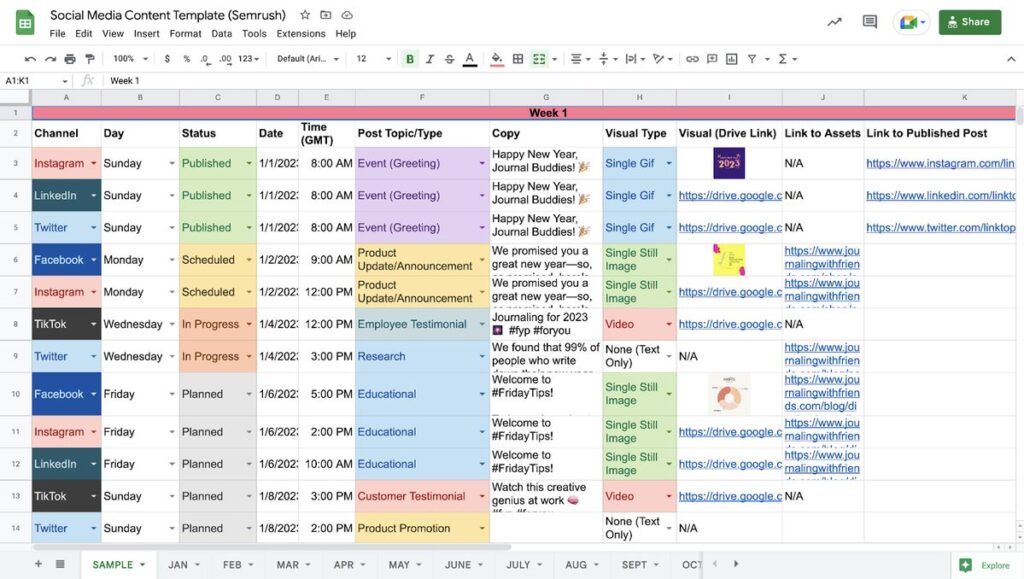
5. Use a Content Calendar Template
- Organize posts by date, platform, caption, visuals, hashtags, and CTAs.
- Tools you can use:
- Google Sheets/Excel
- Trello / Asana
- Notion
- Hootsuite / Buffer / Later
6. Create & Schedule Content
- Design creatives in Canva, Photoshop, or Illustrator.
- Write captions with CTAs and relevant hashtags.
- Schedule posts using tools like Buffer, Hootsuite, or Meta Business Suite.
7. Track & Optimize
- Monitor performance (reach, engagement, clicks, conversions).
- Reuse high-performing content ideas.
- Optimize posting time & strategy for better results.